
💡 The Durability Paradox Maintaining High Speed External SSDs
The shift from traditional hard disk drives HDDs to External Solid State Drives SSDs has revolutionized portable storage, offering speeds over ten times faster, especially with the adoption of NVMe technology over USB 4 and Thunderbolt 4. However, this high performance comes with a unique maintenance paradox: the technology that delivers such blistering speed—NAND Flash—has a finite lifespan.
Unlike HDDs, SSD longevity is determined by the number of times data can be written and erased (Program Erase or PE Cycles). This Ultimate Guide is designed to equip users in 2026 with the essential technical knowledge and practical steps needed to maximize their External SSD Maintenance, ensuring sustained speed, preventing premature failure, and protecting valuable data. Understanding these maintenance protocols is non negotiable for anyone relying on external storage for large media files, system backups, or high demand applications.
1. Understanding NAND Wear and the Role of the TRIM Command
The most fundamental concept in SSD longevity is wear. Every time a memory cell is written to, it degrades slightly. SSD controllers use sophisticated software to manage this degradation.
Wear Leveling The Core of Drive Life
All modern SSDs employ Wear Leveling algorithms. The SSD controller’s primary job is to ensure that write operations are evenly distributed across all available NAND blocks. If one block is written to excessively, it would fail prematurely, rendering the entire drive useless.
-
Static Wear Leveling: Distributes long term, rarely changing data (static) to prevent the rest of the drive from being used up first.
-
Dynamic Wear Leveling: Distributes data that is constantly changing (dynamic) evenly across the free blocks.
Effective maintenance ensures the controller has enough free space to perform this leveling efficiently.
The Critical TRIM Command
The TRIM Command is the most vital software maintenance action for any SSD. When you delete a file on your operating system OS, the OS merely flags the data sectors as available. Without TRIM, the SSD controller doesn’t know the data is gone until it needs to write new data to those sectors (a process that involves slow read-modify-write cycles).
-
Function: TRIM tells the SSD controller immediately which blocks are no longer in use and can be safely erased.
-
Performance Impact: A drive that cannot execute TRIM effectively suffers from Write Amplification, leading to performance degradation and faster wear.
-
Check: Most modern OSs Windows 10 plus, macOS, Linux automatically send the TRIM command for internal drives, but external drives must be checked. Ensure your USB 4 or Thunderbolt 4 enclosure and its controller fully support and relay the TRIM command to the drive inside.
2. Optimizing Space Over Provisioning and Free Space
Free space management is crucial because the controller uses available blocks for wear leveling, garbage collection, and temporary storage during write operations.
Over Provisioning OP
Over Provisioning is dedicating a portion of the total NAND capacity (typically 7 percent to 10 percent) that is invisible to the user. This hidden space is exclusively used by the controller for maintenance tasks.
-
Purpose: OP ensures the SSD always has enough free blocks to perform wear leveling and garbage collection, even when the drive appears full to the OS.
-
Manual Optimization: If your SSD utility allows, manually increase the OP area to 10 percent or 15 percent for maximum long term stability and sustained speed, especially if you routinely push the drive close to its capacity.
The 20 Percent Rule
Never fill your SSD past 80 percent capacity. When an SSD approaches 90 percent or 95 percent full, the controller struggles to find free blocks for efficient write operations and wear leveling, leading to severe slowdowns and increased wear amplification. Maintaining at least 20 percent free space is the simplest and most effective External SSD Maintenance rule.
Users who utilize external SSDs for performance-intensive tasks, such as gaming or data analysis, need to maximize their hardware efficiency across the entire system. Understanding how system components interact, from storage to processing power, is key to success. For a guide to high performance storage and computing, see our comprehensive guide to budget gaming hardware where storage optimization is discussed.

3. Thermal Management The 2026 External SSD Challenge
The most significant maintenance challenge for 2026 external SSDs is Thermal Throttling. High speed NVMe drives, particularly those utilizing the Thunderbolt 4 or USB 4 protocols, can generate immense heat during extended data transfers.
The Heat Speed Relationship
-
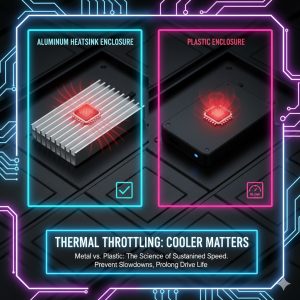
Throttling: When the internal temperature of the SSD controller reaches a critical threshold (often 70 degrees Celsius or higher), the drive automatically reduces its operating speed to prevent hardware damage. This is Thermal Throttling, and it results in drastic speed drops, often seen during large backups or video editing exports.
-
Data Retention: While high heat can cause temporary slowdowns, sustained extreme temperatures over many years can degrade the ability of the NAND cells to retain data, slightly shortening Drive Life.
Maintenance Solutions
-
Enclosure Choice: Opt for external enclosures made of aluminum or those featuring integrated heatsinks. Avoid plastic enclosures, which trap heat.
-
Active Cooling: For professionals performing hours of continuous, high-speed data transfer (e.g., 8K video editing), use an enclosure with a small, integrated cooling fan.
-
Connection Protocols: Be aware that the fastest protocols (USB 4 and Thunderbolt 4) often generate the most heat. If performance is not constantly critical, use lower-speed ports to reduce heat load.
4. File System and Operating System Optimization
The way an SSD is formatted and the OS it runs on significantly impacts its performance and longevity.
File System Choice
The best file system for your external SSD depends on your cross-platform needs:
-
APFS (Apple File System): Best choice for macOS users. It is optimized for SSDs, featuring native TRIM support and highly efficient copy on write mechanisms.
-
NTFS (New Technology File System): Best choice for Windows users. Robust, reliable, and features excellent TRIM support on modern Windows versions.
-
exFAT: The cross-platform compromise. While universal, exFAT has weaker error handling than NTFS or APFS and its TRIM support can be inconsistent across different OS and enclosure combinations. Avoid exFAT for critical data.
OS Specific Tweaks
-
Indexing: Disable file indexing (e.g., Windows Indexing Service or macOS Spotlight) for the external SSD if you rarely search its contents. Indexing causes constant small writes, contributing to unnecessary wear.
-
Hibernation and Sleep: Ensure your OS correctly unmounts or safely enters low power mode when the external drive is inactive to prevent unexpected power loss, which can potentially corrupt data sectors.
5. Data Integrity and Long Term Protection
SSD Maintenance is incomplete without a robust strategy for data integrity and protection, as SSDs can fail suddenly without the warning signs (like clicking sounds) typical of HDDs.
SMART Data Monitoring
Regularly check the drive’s SMART Self Monitoring Analysis and Reporting Technology data using utility software (e.g., CrystalDiskInfo for Windows, DriveDX for macOS).
-
Critical Metrics: Monitor the Total Bytes Written TBW metric against the manufacturer’s specification. Also watch for the Wear Leveling Count and the Unsafe Shutdown Count. A consistently high Unsafe Shutdown count suggests an unreliable connection or power supply.
Backup is Non Negotiable
Due to the sudden nature of SSD failure, never rely on a single external SSD for critical data. Implement the 3-2-1 Backup Rule: three copies of your data, on two different media types (e.g., the external SSD and a cloud service), with one copy stored off site.

✅ Conclusion Prioritizing Longevity and Performance
The Ultimate Guide to External SSD Maintenance for 2026 can be distilled into three core technical priorities:
-
Thermal Control: Manage heat with proper enclosures to prevent Thermal Throttling.
-
Space Management: Maintain at least 20 percent free space and ideally utilize Over Provisioning to facilitate the controller’s maintenance work.
-
Software Health: Ensure the TRIM Command is actively working via your OS and enclosure combination.
By actively managing these factors, you can effectively counteract the inherent wear of NAND technology, ensuring your high speed external SSD maintains its peak performance and provides reliable service for its full expected lifespan.